
Thanks for testing SpaceSuit View.
Tell us what happened, good or bad. Every report shapes what we fix next.
Feedback
Send feedback
A minute is enough. Please don't include passwords or anything private.
Quick start
Your first scene in three minutes
1. Install and open
- Accept the alpha invitation sent to your Meta account email.
- In the headset, open the Library, find SpaceSuit View and install it.
- Open it. The May beetle sample appears with a welcome card. Select Got it.
2. Allow file access
- The menu shows Allow file access. Point at it and pull the trigger.
- On the Android page, switch on Allow access to manage all files, then go back to the app.
The app uses this only to list and import scenes in the headset's Download folder. The two samples work without it.
3. Get a scene and import it
- Menu > Import > Browse SuperSplat. Pick a scene and download it as PLY file (not the SOG / "Source file" download).
- Back in the app, check Splats to keep (500k runs smoother, 750k shows more detail), then select the zip.
- It opens when it's done, and stays on the Scenes tab for next time.
Upside down? Turn Upright fix off on the Import tab, delete the converted scene on the Scenes tab, and import it again.
4. Controls
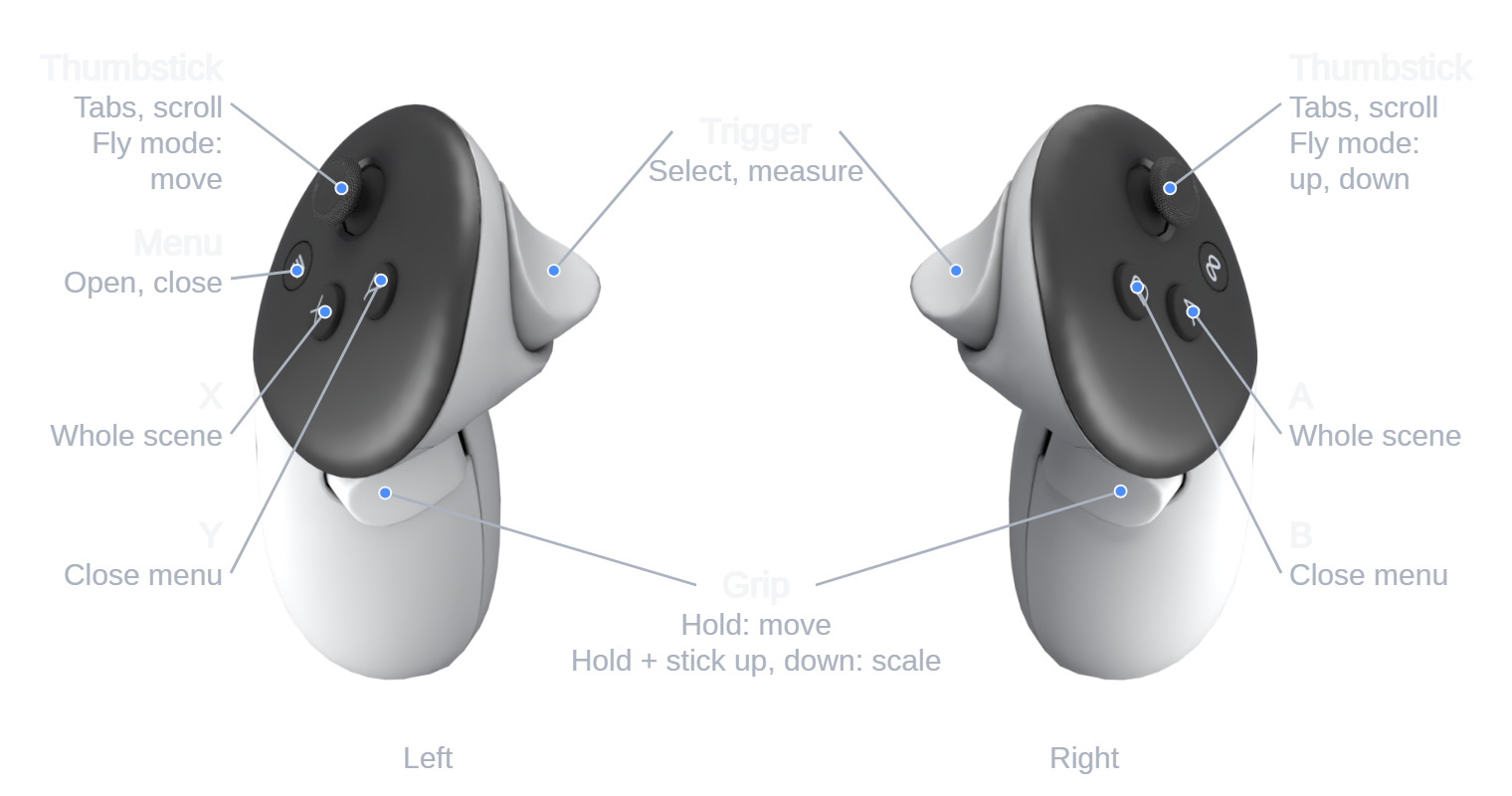
| To | Do this |
|---|---|
| Open or close the menu | Menu button on the left controller. B or Y also closes it. |
| Move the scene | Hold a grip and move your hand. |
| Bigger or smaller | While holding a grip, push the thumbstick up or down. |
| See the whole scene | Press A or X. To come back close: View > Enter scene. |
| Fly through it | View > Fly mode. Left stick moves, right stick goes up and down. |
| Measure | Touch a point with the controller tip and pull the trigger, then a second point. Set the real distance with the thumbstick and pull the trigger to rescale. |
The full guide covers every tab and setting: SpaceSuit View guide (PDF, 8 pages).
Good to know
Known limitations
SpaceSuit View is an early alpha, tested so far on one Meta Quest 3.
Smoothness
Small scenes run at the Quest's full 72 frames per second; large ones don't yet. Measured on a Quest 3 with the samples, each seen from about 0.85 m:
| Scene | Frames per second |
|---|---|
| Potted plant (269,000 splats) | 71 to 73, the full rate |
| May beetle (500,000 splats) | 44 to 47 |
Scenes imported at 500,000 splats run at about the beetle's rate; 750,000 is slower still. You may notice judder when you turn quickly or fly. If it's uncomfortable, stop, and tell us. Making it faster is planned.
Scene size and files
- Imported scenes are reduced to 500,000 splats by default (750,000 optional). Very large scenes lose some fine texture.
- Supported: standard PLY, SuperSplat compressed PLY, and SuperSplat's "PLY file" zip.
- Not supported yet: SOG, SPZ, KSPLAT and SPLAT.
- Size, position and measurements aren't remembered between scenes or sessions yet.
- Delete in the menu removes the file from the headset for good, after you confirm.
Headsets and controls
- Supported: Meta Quest 3, Quest 3S and Quest 2. All figures above were measured on a Quest 3; a Quest 3S hasn't been tested yet.
- On a Quest 2, passthrough is black and white and scenes run slower.
- Controllers are required; hand tracking isn't supported.